


5 EPIC Transition Effects You Can Create With Just Your Camera
- AP

- May 17, 2018
- 3 min read

Creative transition effects can turn a normal video into a kick-ass video. There are many ways to create these effects, even without the knowledge of video editing softwares. Here are a few EPIC transition effects to play with, using just your cameras!
1. The Snap
The Snap is commonly used by vloggers in their travelling videos as it showcases the different backgrounds in a short amount of time.

[How it works]:
1. Focus your camera at the background, with you by the side, and start filming while you snap your finger.
2. Remember how the video was angled and where you were positioned in the video. (This is crucial as it will be more realistic if your positioning is almost exactly the same)
3. Keep the video length short and repeat this for the different locations.
4. String the videos together with any simple editing app or software.
This will give an awesome effect of you teleporting, instead of taking the plane, to those different locations. HOW COOL IS THAT!
2. The Shake
The Shake is a commonly used technique as it can be easily executed without needing much precision.





[How it works]:
1. Start taking your video with you in the foreground.
2. At the point of transition, shake your camera and then stop filming.
3. Head to your new location and angle the camera, such that your position is almost the same as the previous video.
4. Start filming and shake the video at the start, before continuing with your content.
5. Cut the 2 videos at the blurry part and string them together with any simple editing app or software.
With that, your video will have a seamless "shake" to the next location. SHAKE IT!
3. The Swipe
The Swipe is great for a transition to a different topic or to end off with.

[How it works]:
1. Start filming your content.
2. At the point of transition, bring your hand close to the camera lens and swipe it from left to right, vice versa.
3. Head to the new location and start filming again by swiping the same way with your hand.
4. Cut the 2 videos at the part where the hand covers most of the camera and string them together with any simple editing app or software.
Now, you will now be able to swipe to the different places that you want! Just remember that you have to swipe in the correct direction on Tinder.
4. The Whip
The Whip doesn't require you to have a wrist of a badminton player. The magic of this transition effect is in the flick of your wrist.


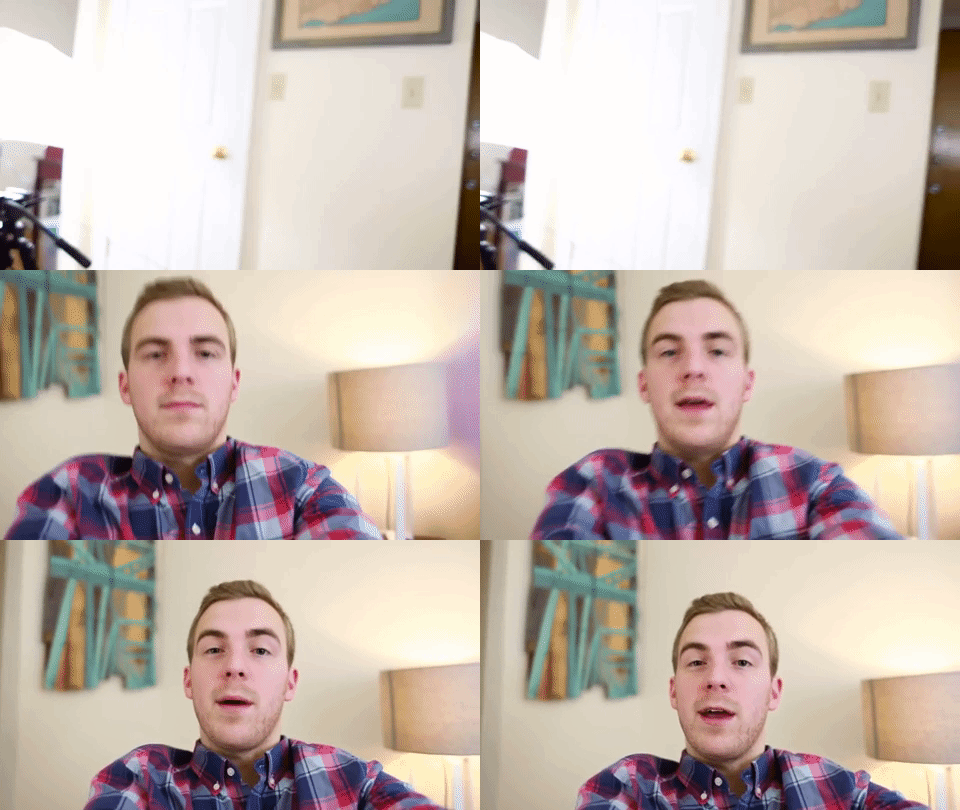
[How it works]:
1. Start filming your content.
2. At the point of transition, flick your wrist either to the left or right.
3. Move to the next location and start filming by flicking your wrist in the same direction.
4. Cut the 2 videos at the part where the hand covers most of the camera and string them together with any simple editing app or software.
Now, you will be able to whip, watch you naenae. Watch you whipwhip, watch you naenae. You get the drift..
5. The Cover
The Cover is a fun and yet simple transition effect. It can be through your mouth, palm or even ears.

[How it works]:
1. Start filming your content.
2. At the point of transition, cover your camera lens through your mouth or any items. (You can have fun by giving the impression that the camera went through your mouth or any body parts)
3. Head over to the next location and cover the camera lens before shooting.
4. Start recording, uncover the lens and continue to film.
5. Cut the 2 videos at the part where the screen is pitch dark stitch the 2 videos together with any simple editing app or software.
Tadah! The camera has just entered your body and came out to continue with the filming. What a dedicated camera/cameraman.
Now you have learnt these cool transition effects. It is time to put that into your videos and create some epic films!
Are there other transition effects that you know of which can be shot just by using a camera? Do share with us on our Facebook page @: https://www.facebook.com/Anonymous.Pro.Asia/posts/10156420218507220
You can also head over to https://www.anonymousproduction.com to find out more on how videos can change the lives of companies and people.


Comments